.jpg)
This guide will help you to enable job postings on your LinkedIn company page and connect them with Taraki, follow the steps below carefully.
Before proceeding, ensure that your LinkedIn Company ID has been added in Taraki and enabled the LinkedIn configuration from the Taraki side.
You must be a Super Admin of your LinkedIn Company Page to complete these steps.
Step 1: Access Your Company Page
-
Log in to your personal LinkedIn account
-
From your homepage:
-
Click your profile picture (“Me” icon) at the top, OR
-
Use the left-hand sidebar
-
Under the Manage section, select your company page
.png?cb=608c565add545728b3e1cb83d7c17f23)
Step 2: Open Job Settings
-
Make sure you are in Admin View of your company page
-
In the left-side menu:
-
Scroll down and click Settings
-
From the submenu, select Job Postings
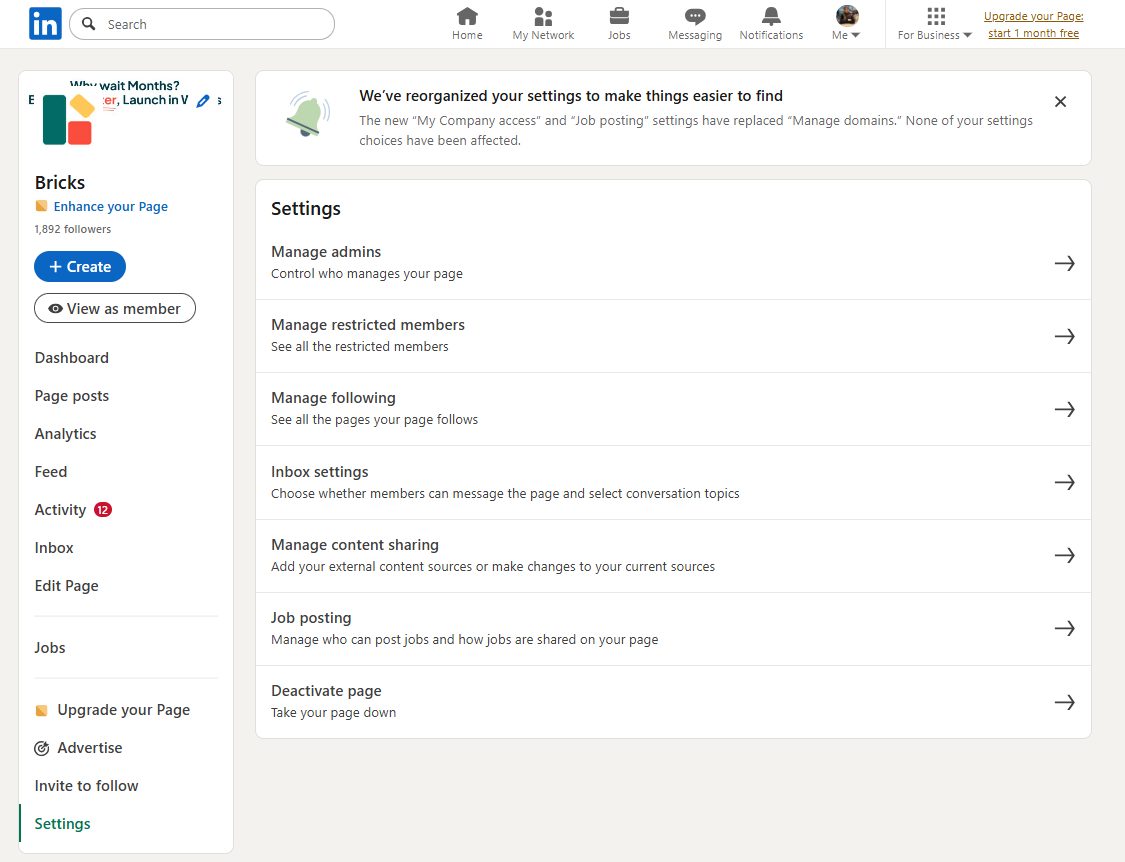
Step 3: Enable Basic Job Posting
-
Locate the “Enable basic job posting” section
-
Turn the toggle ON (it should appear green)
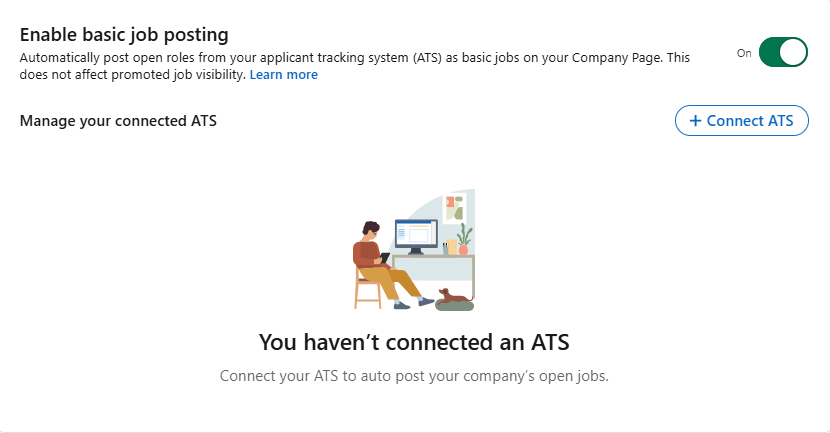
Additional Steps:
Jobs Not Appearing on LinkedIn
If your jobs are not being published to LinkedIn within 24 hours, first verify that your ATS integration is configured correctly.
-
Navigate to your LinkedIn job posting settings.
-
In the ATS selection menu, choose VONQ as shown in the image below.
-
Save the changes and wait for the settings to take effect.
Contact LinkedIn Support
Once the ATS setting has been enabled, you may need LinkedIn to lift any restrictions on your account.
Send an email to LTSATSINTEGRATIONS@linkedin.com requesting a review of your LinkedIn job posting integration.
The email must be sent by your company's Super Admin, as LinkedIn may not process requests submitted by other users.
Email Template:
To: LTSATSINTEGRATIONS@Linkedin.com
Subject: Request to Enable Basic Job Posting Access for Company Page
Hi LinkedIn Team,
We would like to enable basic job postings for our LinkedIn Company Page. The setting has already been enabled from our side.
We kindly request you to review our page and remove any restrictions that may be blocking ATS-based or partner-based job postings.
Company Page URL: [Insert Company Page URL]
Please let us know once this has been enabled or if any additional information is required.
Thank you for your support.
🎉 You're All Set!
Once enabled, any job you post on Taraki will automatically be published to your company’s LinkedIn page.
-
Job approvals are managed by LinkedIn. Some jobs may be rejected based on LinkedIn's policies.
-
ATS integration may not work for companies categorized by LinkedIn as Staffing or Recruitment Agencies.
-
If your jobs are not appearing on LinkedIn, verify your company category and contact LinkedIn Support.